Following some 3rd party scripts to set up replication I got this error:
The Distributor has not been installed correctly. Could not enable database for publishing
To fix this I ran these three scripts.
sp_adddistributor 'NameofDistributorServer';
sp_adddistributiondb N'NameofDatabaseBeingReplicated';
sp_adddistpublisher @publisher = 'NameofDistributorServer', @distribution_db = N'NameofDatabaseBeingReplicated';
This then allowed me to run:
use master;
exec sp_replicationdboption N'NameofDatabaseBeingReplicated ', N'publish', N'true'
Showing posts with label Replication. Show all posts
Showing posts with label Replication. Show all posts
Thursday, August 19, 2010


Friday, April 23, 2010
Replication Error - Login Failure
When setting up replication you might get an error saying login failed.
This will show up in the SQL Error Logs as:
Login failed for domain\username
Followed by
Error: 18456, Severity: 14, State: 6
The error code means that a windows log-in was entered in the place of a SQL log-in. In the case I had it was in the Log Agent Reader security.
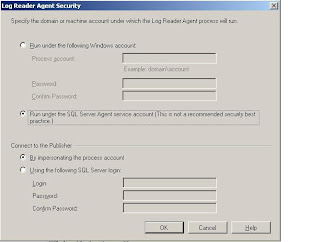
In the section connect to publisher I had entered a windows service account (although it says quite clearly here: using the following SQL Server Login). I didn’t see this though as I added replication through a script which I had adapted.
This will show up in the SQL Error Logs as:
Login failed for domain\username
Followed by
Error: 18456, Severity: 14, State: 6
The error code means that a windows log-in was entered in the place of a SQL log-in. In the case I had it was in the Log Agent Reader security.

In the section connect to publisher I had entered a windows service account (although it says quite clearly here: using the following SQL Server Login). I didn’t see this though as I added replication through a script which I had adapted.
Monday, March 15, 2010
Replication failed between two 2000 machines: server execution failed
After dropping all replication objects and then recreating them the agents were still failing.
The error that was showing stated: server execution failed
Ran the snapshot replication agent from the command line.
To do this go to the sql folder with snapshot.exe In this case C:\Program Files\Microsoft SQL Server\80\COM
Then run snapshot.exe followed by the string found in the second step of the start agent job. In this case: -Publisher [Server2Name] -PublisherDB [replictedDatabaseName] -Distributor [Server2Name] -Publication [nameOfPublication] -DistributorSecurityMode 1
This then generated the real error: ATL71.Dll was missing from – series of directories all defined by PATH.
I did a search and found this dll in the temp directory. I copied it to system32 and re ran the agents.
They are now distributing transactions. It took a while to catch back up again though.
The error that was showing stated: server execution failed
Ran the snapshot replication agent from the command line.
To do this go to the sql folder with snapshot.exe In this case C:\Program Files\Microsoft SQL Server\80\COM
Then run snapshot.exe followed by the string found in the second step of the start agent job. In this case: -Publisher [Server2Name] -PublisherDB [replictedDatabaseName] -Distributor [Server2Name] -Publication [nameOfPublication] -DistributorSecurityMode 1
This then generated the real error: ATL71.Dll was missing from – series of directories all defined by PATH.
I did a search and found this dll in the temp directory. I copied it to system32 and re ran the agents.
They are now distributing transactions. It took a while to catch back up again though.
Subscribe to:
Posts (Atom)